
The “Invalid field: Created By” error in Joomla usually appears when an article is linked to a user ID that no longer exists in your system. This issue commonly occurs after deleting users, migrating websites, restoring backups, or upgrading to newer Joomla versions.
When Joomla attempts to validate the original article author during a save operation, it cannot find the associated user account and throws the error.
JO Power Tools includes a dedicated utility called Article Ownership Fix that allows administrators to repair this problem in bulk without manually editing every affected article.
❓ Why This Happens
1️⃣ Deleted User Accounts
The most common cause is removing a user account from Joomla User Manager while articles created by that user still remain in the database.
When you try to edit or save one of those articles, Joomla validates the “Created By” field against existing users. Since the original author no longer exists, the validation fails.
2️⃣ Database Desynchronization
This issue often appears after:
- Joomla migrations
- Joomla 4 or Joomla 5 upgrades
- Server transfers
- Backup restorations
- Quick-start demo cleanup
Sometimes user records fail to transfer correctly, or demo users are deleted after installation, leaving orphaned article ownership references behind.
3️⃣ Missing or Invalid Author Data
In some cases, the created_by database column may contain:
- Null values
- Invalid integers
- Nonexistent user IDs
- Corrupted author references
This causes Joomla to fail validation during article save attempts.
❓ How to Fix the Error Using JO Power Tools
1️⃣ Install and Access the Extension
Install JO Power Tools from here and open the extension from your Joomla administrator dashboard.
2️⃣ Open Article Ownership Fix
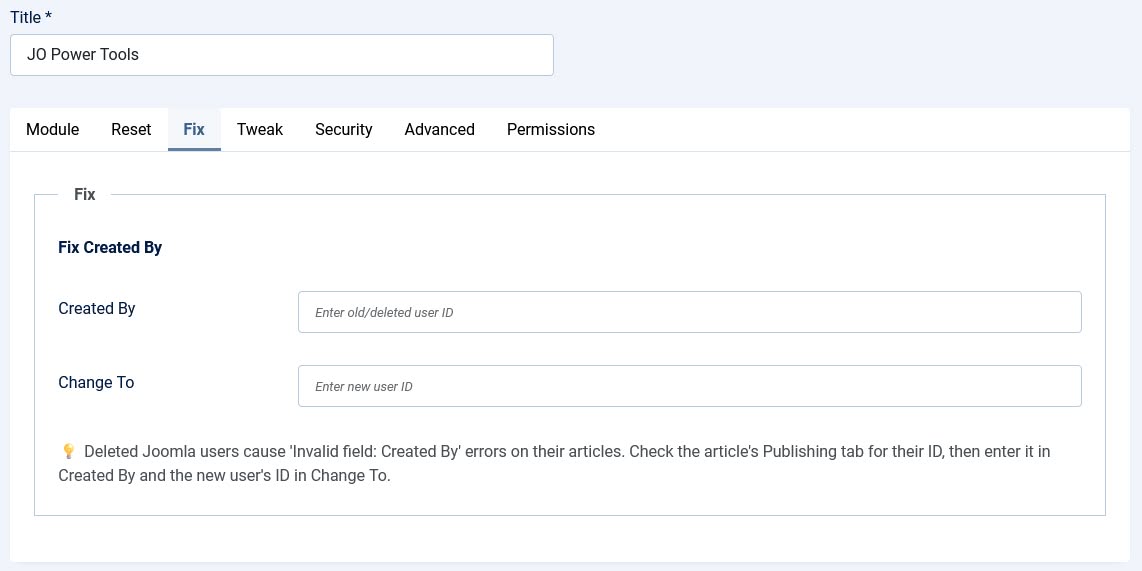
Inside the JO Power Tools dashboard, under the 'Fix' tab, locate the utility named:
"Fix Created By"
This feature is specifically designed to repair broken article ownership references.
3️⃣ Identify the Invalid User ID
In the “Created By” field, enter the ID of the deleted or missing user.
You can usually find this ID directly inside the Joomla article that is showing the error message.
When you try to save the article and see the error “Invalid field: Created By”, the ID shown in the Created By field under the Publishing tab is the invalid user ID.
4️⃣ Assign Articles to a Valid User
In the “Change To” field, enter the ID of an existing Joomla user who should become the new owner of the affected articles.
If you do not know the user ID, you can easily find it from the Joomla administrator panel:
- Go to Users → Manage
- Joomla will display a list of all registered users
- Look at the very last column labeled “ID”
- The number shown there is the Joomla user ID
Enter the desired user ID into the “Change To” field. All articles connected to the invalid or deleted author will then be reassigned to this existing Joomla user.
5️⃣ Run the Fix
Click the "Save" button.
The utility will instantly update all articles associated with the invalid user ID and reassign them to the selected user.
After completion:
✅ Articles become editable again
✅ Joomla validation errors disappear
✅ Ownership references become valid
No manual article editing is required.
🚀 Benefits of Bulk Article Ownership Repair
✅ Saves Time: Repair hundreds or thousands of articles in seconds instead of manually editing each one.
✅ Safer Than Manual Database Editing: Avoid risky SQL queries and direct database modifications that could accidentally damage content tables.
➕ Other Useful Features Included with JO Power Tools
In addition to fixing the “Invalid field: Created By” error, JO Power Tools also includes several other useful utilities. Some notable features include:
🧩 Article Hits Reset: Reset article view counters instantly for selected articles.
🧩 Redirect Link Cleanup: Delete unpublished, broken, or unnecessary redirect links from the Joomla redirect system.
🧩 Session Clear: Clear all active Joomla user sessions from the database while keeping your current administrator session active.
🧩 Database Collation Fix: Repair “Unknown collation” database errors that commonly appear during website restores or migrations between different MySQL versions.
💡 Final Thoughts
The “Invalid field: Created By” error in Joomla is typically caused by orphaned article author references linked to deleted or invalid user accounts.
While the issue can be repaired manually, using a bulk ownership reassignment tool is significantly faster and safer, especially on large websites.
JO Power Tools simplifies the entire repair process with its dedicated Article Ownership Fix utility, allowing Joomla administrators to restore broken articles and repair ownership references with just a few clicks.